- The Formula Notebook
- Posts
- Sorting in Notion the Right Way
Sorting in Notion the Right Way

Didier
October 14, 2023
With the introduction of Formulas 2.0, Notion allowed us to use the .sort() function to sort lists of numbers, dates, or even text:

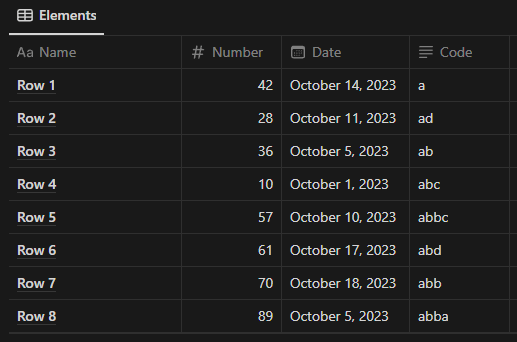
Using this function, we can sort a list of rows like these:
And organize the elements into a related table:
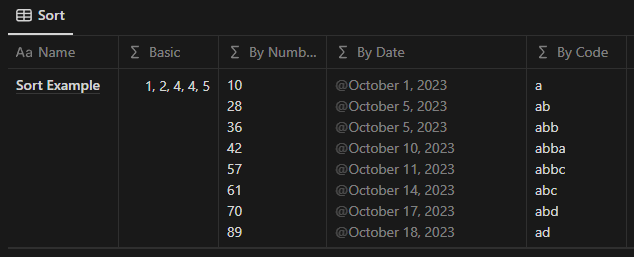
Using these Formulas:

But this Formula has one problem
If two of the rows being sorted have the same value - as we see in the Date - Notion will repeat the first row in every one of the others.
Adding a mix of .map() and .find() to the Formula we can get the row for each date and reveal the issue.
Formula

Result

Both rows 3 and 8 have the same.
But because 3 will always come first, Notion will always match October 5 with row 3.
However, this issue can be avoided
By using the ID property when sorting the values, we can tell Notion which value we want in each position.
We have to be careful, though, not to modify the value we are using to sort.
First, add an ID property to the rows in the database you want to sort.

Then, change the sorting Formula to use the ID in the like this:
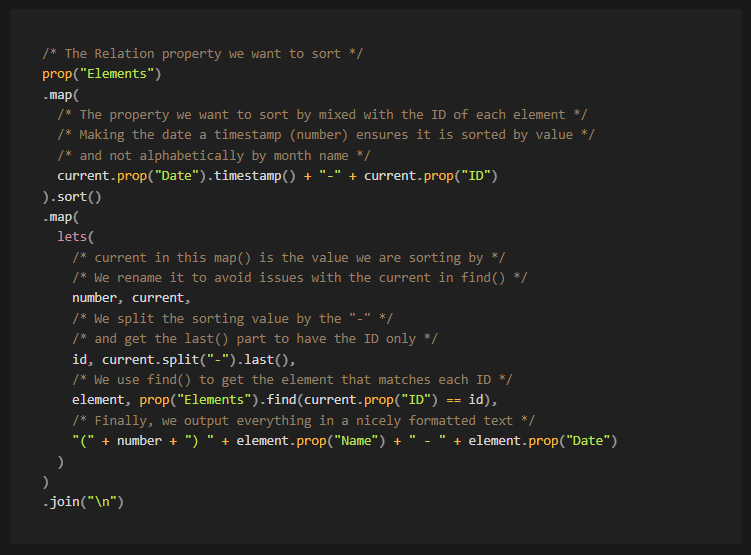
Which will finally give us the result we were looking for:
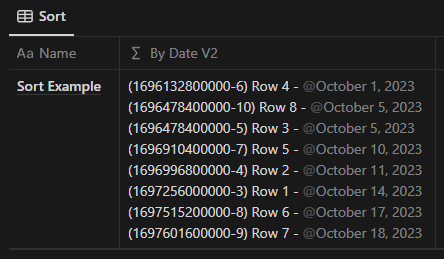
In the case of numbers, I use a slight variation of the formula where I add the ID as a number several places after the decimal point. And change the find accordingly, like this:

I hope you found this Formula useful, I have been using it in a lot of templates.
If you have any comments or questions, feel free to reply to this email or DM me on X.
See you again in two weeks,
Didier